3D Space Visualization
space_profile visualizes 3D vector fields (e.g. displacement fields) as
arrows, powered by PyVista. space_animation plays time-dependent vector
fields in an interactive PyVista window.
Installation
pip install ferrodispcalc[vis]
Quick Start
from ase.io import read
from ferrodispcalc.compute import calculate_displacement
from ferrodispcalc.neighborlist import build_neighbor_list
from ferrodispcalc.vis import grid_data, space_profile

atoms = read("structure.vasp")
nl = build_neighbor_list(atoms, ["Pb"], ["O"], 4, 12, False)
disp = calculate_displacement(atoms, nl)
d_grid, coord = grid_data(atoms, disp, ["Pb"],
                           target_size=[40, 20, 11],
                           return_coord=True)

# Grid mode (recommended -- supports gradient coloring)
space_profile(d_grid, color_by="dz", cmap="coolwarm", factor=25.0)

# Or point mode
pts = coord.reshape(-1, 3)
vecs = d_grid.reshape(-1, 3)
space_profile(vecs, coord=pts, color_by="magnitude")
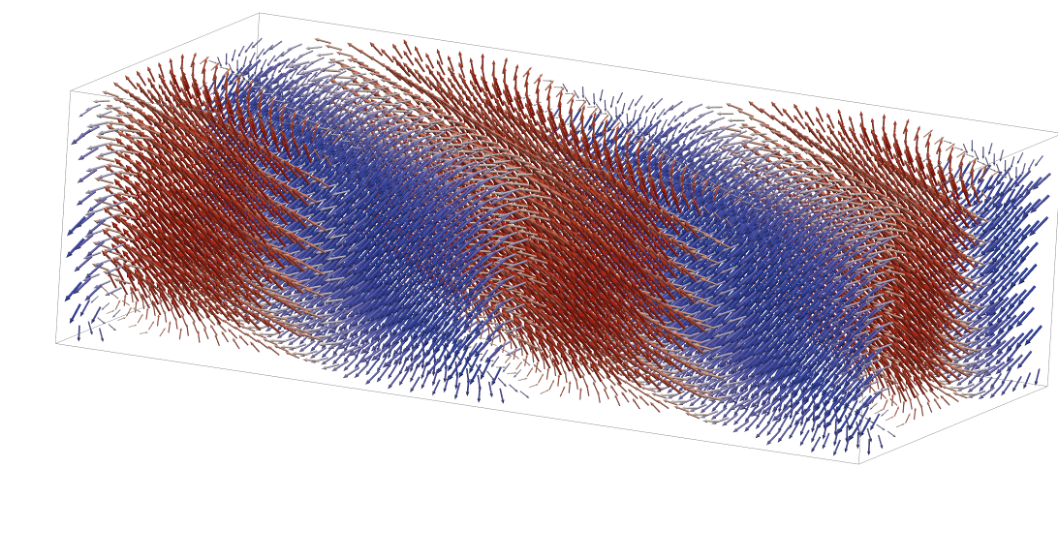
Example output of space_profile with color_by="dz".
Input Modes
space_profile accepts two data layouts:
Grid mode –
datahas shape(nx, ny, nz, 3). Coordinates are generated automatically from grid indices; thecoordargument is ignored.Point mode –
datahas shape(npoint, 3). You must also passcoordwith the same shape.
Coloring (color_by)
Controls how arrows are colored:
'magnitude'– vector norm'dx'/'dy'/'dz'– single component value'all'– RGB mapping (each component normalized to [0, 1])'gradient'– gradient field magnitude (grid mode only)
cmap sets the matplotlib colormap (default "coolwarm"; ignored when
color_by="all"). clim overrides the colorbar range, e.g.
clim=(-0.2, 0.2).
Region Selection (select)
Display a sub-region by filtering in fractional coordinates. In grid mode,
fractions are derived from grid indices automatically. In point mode, you
must also pass the cell parameter (the 3x3 lattice matrix):
# Grid mode -- no cell needed
space_profile(d_grid, color_by="dz",
              select={"x": [0.5, 1.0], "y": None, "z": None})

# Point mode -- cell required
import numpy as np
cell = np.array(atoms.cell)
space_profile(vecs, coord=pts, color_by="dz",
              select={"x": [0.5, 1.0], "y": None, "z": None},
              cell=cell)
Each key ('x', 'y', 'z') maps to a [lo, hi] range or None
(no filtering on that axis).
Display Options
factor– arrow scale factor (default25.0)projection–"ortho"(default) or"persp"show_bounding_box– draw a wireframe box around the full point cloud (defaultTrue)show_axes– show the XYZ orientation widget (defaultTrue)
Animation
Use space_animation for time-dependent 3D vector fields. Grid-mode
animations use (nframe, nx, ny, nz, 3) data. Point-mode animations use
(nframe, npoint, 3) data with a matching coord array.
from ferrodispcalc.vis import space_animation

# disp_grid has shape (nframe, nx, ny, nz, 3)
space_animation(
    disp_grid,
    color_by="dz",
    cmap="coolwarm",
    factor=10.0,
    stride=(2, 1, 1),
    frame_step=2,
    fps=20,
)
The animation window includes a frame slider. Press space to pause or resume
playback, and use the left/right arrow keys to step through displayed frames.
For large datasets, use stride for spatial down-sampling and
frame_step or frame_indices for temporal down-sampling.
Custom Plotter
Pass an existing pv.Plotter to overlay multiple visualizations or
customize the scene. When a plotter is provided, space_profile adds meshes
to it but does not call show(), so you retain full control:
import pyvista as pv

pl = pv.Plotter()
space_profile(d_grid, color_by="dz", plotter=pl)
pl.show()
API Reference
- ferrodispcalc.vis.space_plot.space_profile(data: np.ndarray, coord: np.ndarray | None = None, *, color_by: str = 'dz', cmap: str = 'coolwarm', factor: float = 25.0, projection: str = 'ortho', clim: tuple[float, float] | None = None, select: dict | None = None, cell: np.ndarray | None = None, title: str = '3D Vector Field', show_bounding_box: bool = True, show_axes: bool = True, plotter: pv.Plotter | None = None) pv.Plotter[source]
Plot a 3D vector field using PyVista.
Two input modes are supported:
Grid mode – data has shape
(nx, ny, nz, 3). Coordinates are generated automatically from grid indices and coord is ignored.Point mode – data has shape
(npoint, 3)and coord (also(npoint, 3)) must be provided.
- Parameters:
data (np.ndarray) – Vector data.
(nx, ny, nz, 3)for grid mode or(npoint, 3)for point mode.coord (np.ndarray or None) – Cartesian coordinates
(npoint, 3). Required for point mode, ignored for grid mode.color_by (str) – Coloring strategy:
'magnitude','dx','dy','dz','all'(RGB from components), or'gradient'(grid mode only).cmap (str) – Matplotlib colormap name (ignored when color_by=’all’).
factor (float) – Arrow scale factor passed to
pv.PolyData.glyph.projection (str) –
'ortho'for parallel projection,'persp'for perspective.clim (tuple or None) – Colorbar range
(vmin, vmax). None for automatic.select (dict or None) – Region filter in fractional coordinates. Keys are
'x','y','z'; values are[lo, hi]or None (no filter). In grid mode fractions are computed from grid indices; in point mode cell is required.cell (np.ndarray or None) –
(3, 3)lattice matrix (rows = lattice vectors). Only needed when select is used in point mode.title (str) – Window title.
show_bounding_box (bool) – Draw a wireframe box around the full point cloud.
show_axes (bool) – Show orientation axes widget.
plotter (pv.Plotter or None) – Reuse an existing plotter. A new one is created when None.
- Returns:
The plotter instance (already shown).
- Return type:
pv.Plotter
- ferrodispcalc.vis.space_plot.space_animation(data: np.ndarray, coord: np.ndarray | None = None, *, color_by: str = 'dz', cmap: str = 'coolwarm', factor: float = 25.0, projection: str = 'ortho', clim: tuple[float, float] | None=None, select: dict | None = None, cell: np.ndarray | None = None, title: str = '3D Vector Field Animation', show_bounding_box: bool = True, show_axes: bool = True, show_slider: bool = True, show_frame_text: bool = True, plotter: pv.Plotter | None = None, stride: int | Sequence[int] = 1, frame_indices: Sequence[int] | slice | None = None, frame_step: int = 1, fps: float = 20.0, autoplay: bool = True, loop: bool = True, dtype: type | str | np.dtype = <class 'numpy.float32'>) pv.Plotter[source]
Play a 3-D vector-field animation in a PyVista window.
Two time-dependent input modes are supported:
Grid mode - data has shape
(nframe, nx, ny, nz, 3). Coordinates are generated automatically from grid indices and coord is ignored.Point mode - data has shape
(nframe, npoint, 3)and coord has shape(npoint, 3).
The scene is created once and updated in-place as frames advance. A slider widget is shown by default for direct frame selection. Keyboard shortcuts are available when more than one frame is selected: space toggles playback, and the left/right arrow keys step backward/forward by one displayed frame.
- Parameters:
data (np.ndarray) – Vector animation data. Expected shape is
(nframe, nx, ny, nz, 3)for grid mode or(nframe, npoint, 3)for point mode.coord (np.ndarray or None) – Cartesian coordinates
(npoint, 3). Required for point mode, ignored for grid mode.color_by (str) – Coloring strategy:
'magnitude','dx','dy','dz','all'(RGB from components), or'gradient'(grid mode only).cmap (str) – Matplotlib colormap name (ignored when color_by=’all’).
factor (float) – Arrow scale factor passed to
pv.PolyData.glyph.projection (str) –
'ortho'for parallel projection,'persp'for perspective.clim (tuple or None) – Colorbar range
(vmin, vmax). None updates the scalar range from the current frame.select (dict or None) – Region filter in fractional coordinates. Keys are
'x','y','z'; values are[lo, hi]or None (no filter). In grid mode fractions are computed from grid indices; in point mode cell is required.cell (np.ndarray or None) –
(3, 3)lattice matrix (rows = lattice vectors). Only needed when select is used in point mode.title (str) – Window title.
show_bounding_box (bool) – Draw a wireframe box around the full point cloud.
show_axes (bool) – Show orientation axes widget.
show_slider (bool) – Show a frame slider at the bottom of the window.
show_frame_text (bool) – Show the current frame index in the upper-left corner.
plotter (pv.Plotter or None) – Reuse an existing plotter. A new one is created when None.
stride (int or sequence of int) – Spatial down-sampling. In grid mode, an int applies to all axes and a 3-item sequence applies to
x,yandz. In point mode, only an int stride is accepted.frame_indices (sequence of int, slice, or None) – Frames to expose in the animation. None selects all frames after applying frame_step.
frame_step (int) – Temporal down-sampling step used when frame_indices is None; also applied to a slice selection when greater than one.
fps (float) – Playback rate in displayed frames per second.
autoplay (bool) – Start playback immediately when the window opens.
loop (bool) – Restart from the first displayed frame after the last one.
dtype (type, str, or np.dtype) – Floating dtype used for the per-frame vector arrays passed to PyVista.
- Returns:
The plotter instance. When plotter is None, the window is shown before returning.
- Return type:
pv.Plotter